
Zillow – Real Time Tour Leads
What is a Real Time Tour (RTT) lead?
Connect with high-intent customers, get to your first face-to-face appointment faster and save time with ShowingTime-integrated booking.
Answering the Real Time Tour call
Caller ID on your device will show – “Real Time Tour” for all RTT leads.
-
This allows agents to review the tour request without having to speak to a buyer in real time.
-
If you don’t see the Real-Time Touring Caller ID on your mobile device when you receive a Real-Time Tour lead, update your Premier Agent App.
-
You have 5 Minutes to commit or pass Reminder (no live customer on the line).
-
Only accept the tour if you can commit to fulfilling one of the times requested. Otherwise, pass it on to the team.
The Golden Text
Within 30 minutes of committing to the appointment then:
Text to confirm using the Golden Text
For example:
“Hey it’s Kevin with Designed Realty! Zillow sent me your info, and I’m excited to give you a tour of 123 Main Street in Snohomish at 3:00 PM tomorrow. Just to confirm, does this time still work for you?”
Key elements of the Golden Text include:
-
Stating your name and brokerage
-
Reminding the buyer that Zillow connected you
-
Confirming the tour location and time.
-
Do not ask for pre-approval information in the first communication(s), unless the specific listing requirements in Showingtime require/ask for it.
If necessary, you can call, but do so after sending the Golden Text.
Managing The Appointment
Real-Time Tours should be managed directly in the Premier Agent App.
Communicate any changes to the appointment with the buyer.
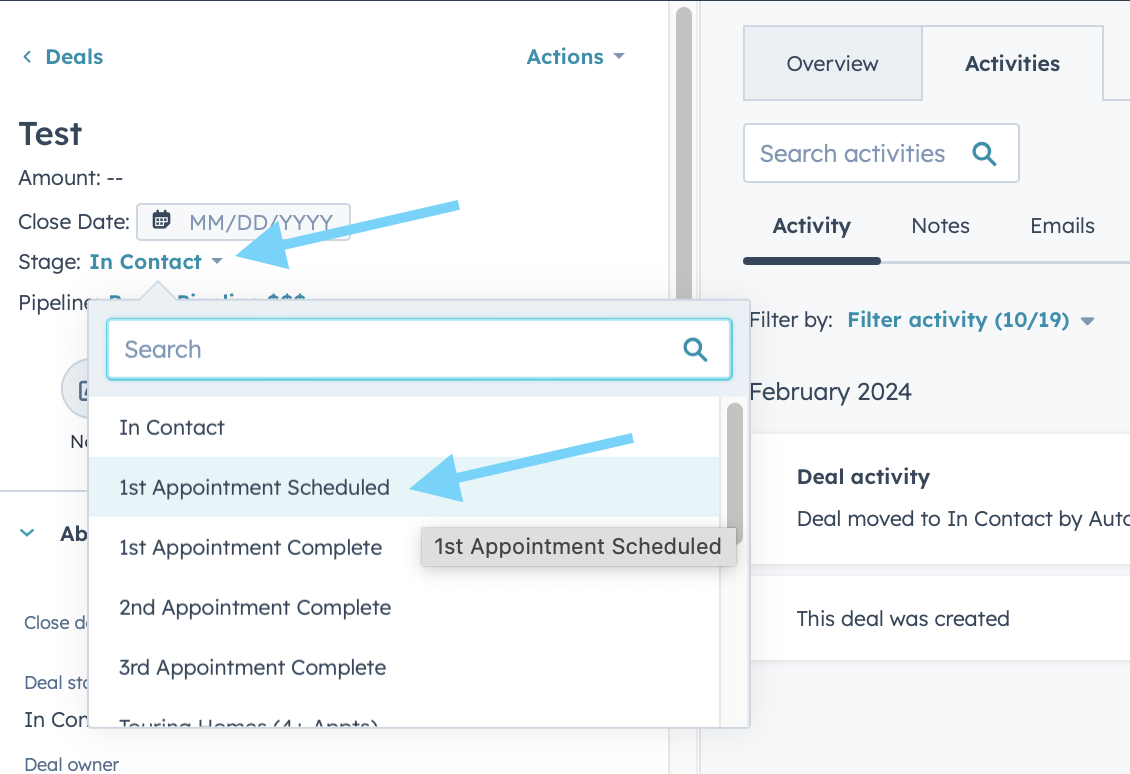
Once appointment has been scheduled, then progress the deal stage to 1st Appt Scheduled in Hubspot!
Communication from Zillow to Lead
Buyer Communications from Zillow
Agents will be cc’d on all email communications that are sent to the buyer once the tour is accepted.
-
After they submit their request (and before its been accepted by an agent)
-
Tour Details: Property Address & Requested Times.
● Note that you are looking for a Buyer’s Agent to take them on a tour.
-
-
As soon as an agent has accepted the lead
-
Tour Details: Property Address & Selected Time.
Agent Details: Your name, phone number, email, and a link to your Agent Profile on Zillow.
● Note to reach out to you directly in case they need to cancel or reschedule.
-
-
Tour day reminders
-
Zillow sends the buyer a text reminder at 24 hours and 2 hours prior to the confirmed tour time.
-
-
If the tour is rescheduled
-
Tour Details: Property Address & Updated Time.
Agent Details: Your name, phone number, email, and a link to your Agent Profile on Zillow.
● Note to reach out to you directly in case they need to cancel or reschedule.
-
-
If the tour is canceled
-
Tour Details: Property Address
Agent Details: Your name, phone number, email, and a link to your Agent Profile on Zillow.
● Note that you will contact them with additional details.
-
-
If the initial tour request fails
-
Tour Details: Property Address & Requested Times
Agent Details: Your name, phone number, email, and a link to your Premier Agent Profile on Zillow.● Note that we weren’t able to book the tour yet, but that you will be in touch with additional details.
-
RTT | No Confirmation
What do I do if a RTT lead does not confirm with me?
If RTT doesn’t confirm after multiple attempts and reach outs you can let them know you are canceling.
Don’t be shy about confirming. Multiple calls and texts is okay if unanswered, when initially trying to confirm give them time to respond but closer you get to showing you can ramp it up.
PLEASE NOTE: THIS METHOD DOES NOT APPLY TO ANY OTHER LEAD